Step-by-Step Assembly Process

With materials selected and layers prepared, you're ready to assemble your shadow box. Follow
these steps
carefully for professional results.
Step 1: Create Your Assembly Workspace
Set up a clean, flat workspace with:
- Adequate lighting (natural light or bright task lamp)
- Clean hands (oils and moisture transfer to paper, especially visible on white cardstock)
- All tools within reach (scissors, tweezers, ruler, pencil)
- Layers organized in order with numbers visible
- Cut spacers ready (if using foam board)
- Adhesives prepared and accessible
Pro tip: Work on a self-healing cutting mat or clean piece of cardboard. The slight
texture
helps prevent paper from sliding during alignment while the surface remains flat.
Step 2: Prepare Spacers for First Layer Join
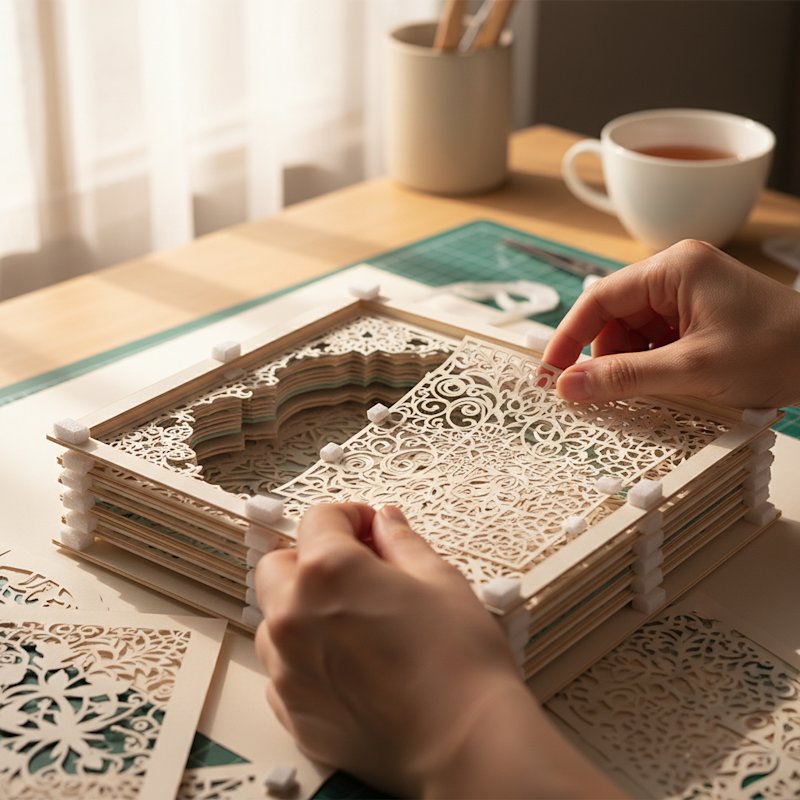
Starting with the back layer (highest number), plan your spacer placement. The goal is even support
that's
completely invisible from the front when the shadow box is finished.
Strategic spacer positioning:
- Corners: Place spacers approximately 5-10mm from each corner, but not so close
that
they're visible from the front through cutouts
- Along edges: Position spacers every 5-7cm along each edge for large layers (8×8
inches or
larger)
- Behind solid areas: Only place spacers in areas of the paper that are solid (not
cut away).
Hold layers up to light to verify spacer placement won't show through cutouts
- Balance: Distribute spacers evenly so layers have uniform support across the
entire surface
Quantity guide:
- Small layers (6×6 inches or smaller): 6-8 spacers
- Medium layers (8×8 to 8×10 inches): 8-12 spacers
- Large layers (11×14 inches or larger): 12-16 spacers
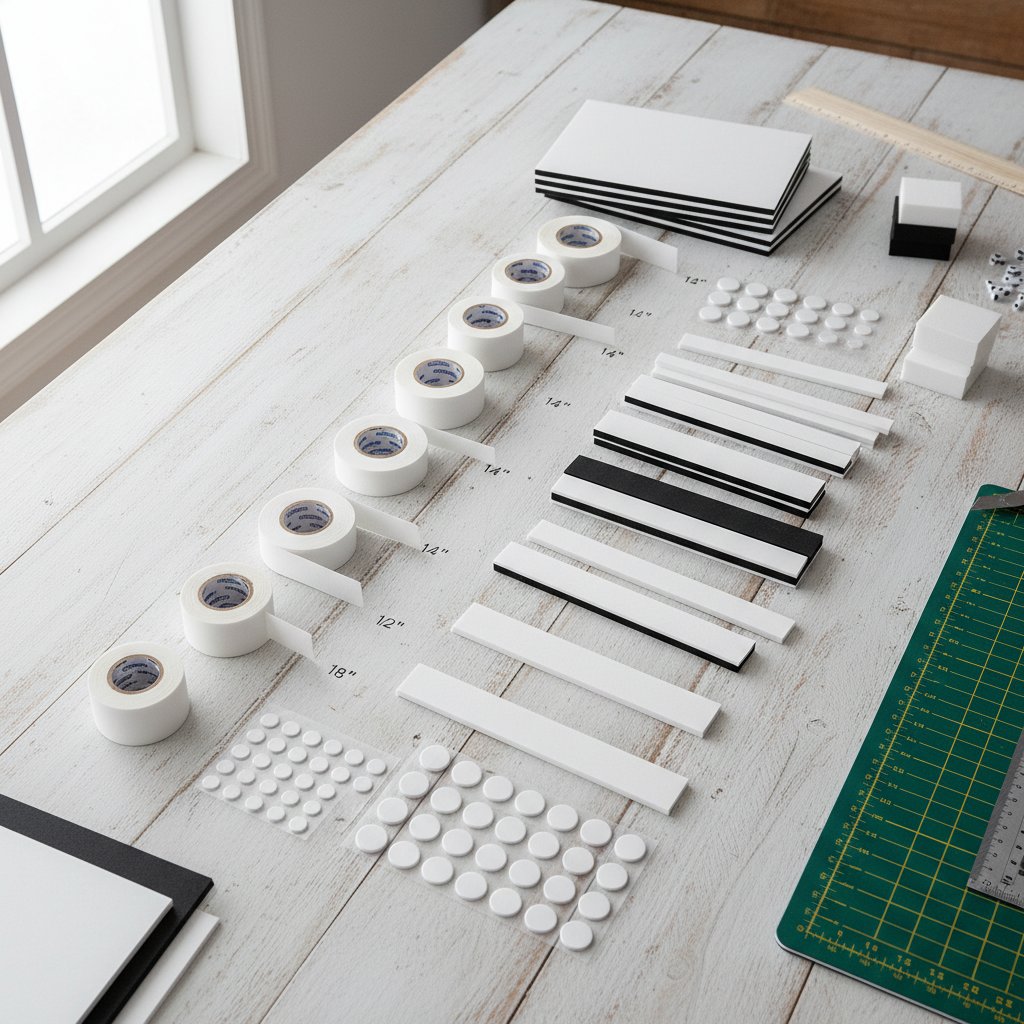
Cut your foam tape pieces into approximately 1cm × 1cm rectangles. Remove the protective backing from
one side
only, then press these onto the back of your starting layer in your planned positions.
Positioning tip: Lightly mark spacer positions with a pencil on the back of your
layer before
attaching spacers. This prevents trial-and-error repositioning that reduces foam adhesive strength.
Step 3: Align and Attach the Next Layer
Remove the protective backing from the exposed side of your spacers (the side now facing up). Pick up
the next
layer in sequence (one number lower).
Alignment technique:
-
Edge alignment method: Hold the next layer above the layer with spacers
attached. Align one
edge first (bottom or left edge works well), making sure edges match perfectly.
-
Lower carefully: Keeping that first edge aligned, gently lower the layer
straight down onto
the spacers. Don't drag or slide the layer, as this can misalign spacers or create crooked
placement.
-
Visual verification: Before pressing down firmly, verify that:
- All four edges align (square layers should have even borders all around)
- Design elements line up correctly (windows above windows, branches align, etc.)
- No spacers are visible through cutouts from the front angle
-
Final pressing: Once satisfied with alignment, press down firmly at each spacer
location.
Apply steady, even pressure for 3-5 seconds per spacer to ensure good adhesive contact.
Alignment aid for registration marks: If your template includes corner registration
marks or
alignment squares, use these to guide layer positioning. These marks are designed to line up perfectly
and make
alignment almost foolproof.
Using the frame method: Some crafters position the frame face-down on their work
surface and use
the frame's interior edges as alignment guides. Place the back layer inside the frame, add
spacers, then lower
the next layer using the frame edges to ensure perfect alignment. This method works especially well
for square or
rectangular designs.
Step 4: Repeat for All Remaining Layers
Continue the process layer by layer:
- Add spacers to the back of the layer you just attached
- Remove protective backing from spacer tops
- Align the next layer in sequence
- Lower carefully and press firmly
Offset spacer positioning: For shadow boxes with many layers (10+), consider
offsetting spacer
positions on alternating layers. For example:
- Odd-numbered layers: spacers near corners and center of edges
- Even-numbered layers: spacers between corner positions and center points
This offset pattern prevents spacers from stacking directly on top of each other through all layers,
which can
create visible "columns" of support that might show through intricate cutouts. It also
distributes
stress more evenly across the entire structure.
Step 5: Add the Front Layer
The front layer (typically Layer 1) is what viewers see first, so take extra care with this final
alignment.
Front layer considerations:
- This layer typically has the most prominent cutout or design element
- Misalignment is most obvious on the front layer
- Edge alignment is critical since frame edges meet this layer
Use the same alignment technique as previous layers, but verify alignment from multiple viewing
angles before
pressing down firmly. Stand back and view the shadow box from where it will be displayed to ensure
everything
looks straight and properly positioned.
Step 6: Reinforce Critical Points
Once all layers are assembled, inspect your shadow box for areas that might need additional support:
Stress points to reinforce:
- Large cutout areas with minimal solid paper around them
- Corners that seem to flex or move slightly
- Edges of the top and bottom layers (where frame pressure will be applied)
- Any layer joins that feel less secure than others
Apply tiny dots of precision liquid glue at these stress points on the edges of layers (not on
surfaces that will
show through cutouts). These reinforcements prevent sagging over time and ensure long-term structural
integrity.
Step 7: Final Inspection and Curing
Lay your assembled shadow box flat on your work surface and allow all adhesives to cure fully. Most
foam
adhesives reach maximum strength after 30-60 minutes, while liquid glues may need 2-4 hours depending
on the type.
Final inspection checklist:
- ✓ All layers present and in correct order
- ✓ No visible spacers showing through cutouts when viewed from front
- ✓ All edges aligned evenly
- ✓ No warping, bowing, or buckling of paper
- ✓ Design elements aligned as intended
- ✓ Adhesive fully set and layers firmly attached
- ✓ No visible glue marks on front-facing surfaces
While adhesive cures, resist the temptation to handle the shadow box excessively. The layers need
undisturbed
time to bond firmly.